Gaussian Splatting
Since version 9.0, 3DF Zephyr also supports a Gaussian Splatting workflow that ties directly within the established photogrammetry pipeline.
Gaussian Splats in Zephyr are always generated from an underlying geometric structure that has to already be present in the workspace: any structured point cloud is valid.
- the initial sparse point cloud from the SfM result
- raw dense point clouds (coming from our own photgrammetric MvS pipeline)
- external dense point clouds (e.g. coming from laserscan) that is then structured
- for best result, a dense cloud refined by our photoconsistency meshing algorithm
All of the above are all valid input data to generate a Gaussian Splat.
Keep in mind that Gaussian Splats yield view synthesis visualization, not a new geometric deliverable like a dense cloud or mesh.
Please note that at this time multiple GPUs are not supported for Gaussian Splat generation (so even if you have multiple GPUs you'll be processing only one one). CUDA-enabled cards will peform the best. Running via OpenCL is possible, but with lower performances compared to a CUDA card. CPU processing is strongly not advised as it will be very slow.
Gaussian splatting generation is very GPU memory intensive: depending on your datasets size, a modern NVIDIA GPU is recommended with a high amount of VRAM available.
Gaussian splatting can be queued directly in the new Project Wizard, or can be triggered from the Workflow > Advanced > Dense Point Cloud Generation menu or by clicking on the corresponding icon in the toolbar. As usual, the wizard will guide you through the preset selection or you can switch to the advanced mode.
Advanced parameters are explained in detail below:
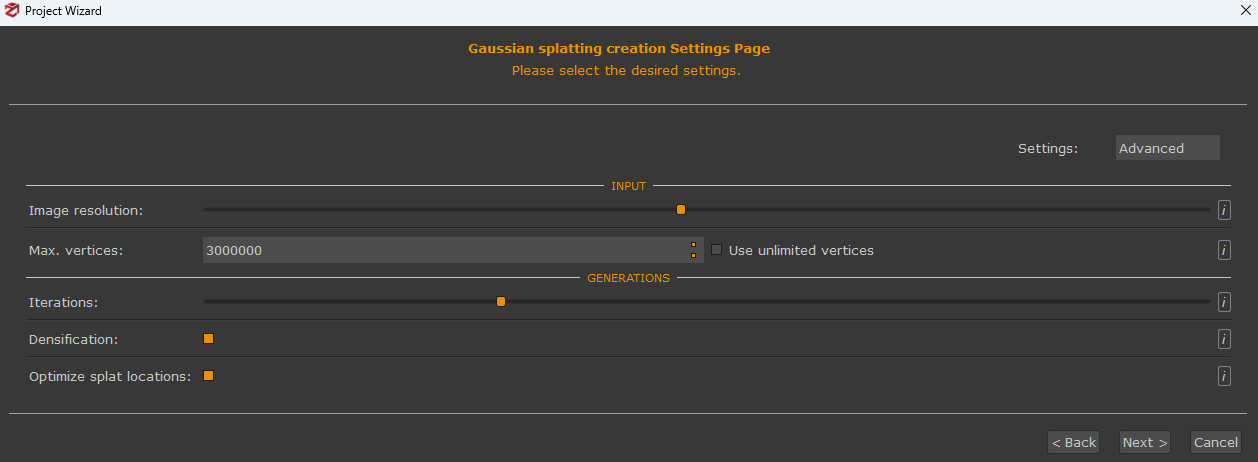
Image Resolution: Controls the percentage of the input images resolution .
Max. Vertices: Maximum number of vertices used from the input point cloud.The input point cloud will be decimated if necessary, and it is possible to check the "use unlimited vertices" if desired. Computational cost scales steeply with this value, and pushing it too high causes computation time to explode.
Iterations: Number of iterations for the optimization procedure.
Densification: Set to densify the point cloud inside the optimization procedure. This allows the algorithm to grow the number of splats during optimization using internal heuristics, creating new points where none existed before. This is why simply starting with more input points is not equivalent: the algorithm can generate splats in regions that didn't exist in the original input, something no initial point density can replicate
Optimize splat locations: Set to optimize the splats locations during the optimization procedure. It's suggested to leave this option enabled initially, as the splats move relative to their initial positions. In some cases, however, this may create artifacts; if this occurs, it's recommended to disable this option.